<?php namespace App\Command; use Symfony\Component\Console\Command\Command; use Symfony\Component\Console\Input\InputArgument; use Symfony\Component\Console\Input\InputInterface; use Symfony\Component\Console\Input\InputOption; use Symfony\Component\Console\Output\OutputInterface; use Symfony\Component\Console\Style\SymfonyStyle;
[root@lightdb ~]# pvdisplay --- Physical volume --- PV Name /dev/sdb1 VG Name vg PV Size 931.51 GiB / not usable 4.00 MiB Allocatable yes PE Size 4.00 MiB Total PE 238466 Free PE 1 Allocated PE 238465 PV UUID 3MQezN-W53d-oj6q-I3GK-9GdP-j4Yj-hag2Dj
[root@lightdb ~]# vgdisplay --- Volume group --- VG Name vg System ID Format lvm2 Metadata Areas 1 Metadata Sequence No 4 VG Access read/write VG Status resizable MAX LV 0 Cur LV 3 Open LV 3 Max PV 0 Cur PV 1 Act PV 1 VG Size <931.51 GiB PE Size 4.00 MiB Total PE 238466 Alloc PE / Size 238465 / 931.50 GiB Free PE / Size 1 / 4.00 MiB VG UUID dzuyJa-LoIn-ZUAY-BvEN-X13J-EYkc-daFgy5
[root@lightdb ~]# lvdisplay --- Logical volume --- LV Path /dev/vg/swap LV Name swap VG Name vg LV UUID qNuaiE-j4mA-5dZJ-RsZZ-YqKX-4zSm-P2vWg8 LV Write Access read/write LV Creation host, time lightdb, 2018-05-12 15:20:38 -0400 LV Status available # open 2 LV Size <7.88 GiB Current LE 2016 Segments 1 Allocation inherit Read ahead sectors auto - currently set to 256 Block device 253:1 --- Logical volume --- LV Path /dev/vg/tmp LV Name tmp VG Name vg LV UUID oaS1B0-eSu3-s7B4-L2Dl-EUAs-wQxU-Ueohsl LV Write Access read/write LV Creation host, time lightdb, 2018-05-12 15:20:39 -0400 LV Status available # open 1 LV Size 1.00 GiB Current LE 256 Segments 1 Allocation inherit Read ahead sectors auto - currently set to 256 Block device 253:2 --- Logical volume --- LV Path /dev/vg/root LV Name root VG Name vg LV UUID wqdC7u-9sg4-ekEH-dwR5-kBpy-PdN0-TXVcN0 LV Write Access read/write LV Creation host, time lightdb, 2018-05-12 15:20:40 -0400 LV Status available # open 1 LV Size <922.63 GiB Current LE 236193 Segments 1 Allocation inherit Read ahead sectors auto - currently set to 256 Block device 253:0
[root@lightdb ~]# pvdisplay --- Physical volume --- PV Name /dev/sdb1 VG Name vg PV Size 931.51 GiB / not usable 4.00 MiB Allocatable yes PE Size 4.00 MiB Total PE 238466 Free PE 1 Allocated PE 238465 PV UUID 3MQezN-W53d-oj6q-I3GK-9GdP-j4Yj-hag2Dj "/dev/sda2" is a new physical volume of "<931.27 GiB" --- NEW Physical volume --- PV Name /dev/sda2 VG Name PV Size <931.27 GiB Allocatable NO PE Size 0 Total PE 0 Free PE 0 Allocated PE 0 PV UUID gGrU32-2AW0-10Sv-upON-cXEE-hqC9-fe3X76
[root@lightdb ~]# vgextend vg /dev/sda2 Volume group "vg" successfully extended
[root@lightdb ~]# vgdisplay --- Volume group --- VG Name vg System ID Format lvm2 Metadata Areas 2 Metadata Sequence No 6 VG Access read/write VG Status resizable MAX LV 0 Cur LV 3 Open LV 3 Max PV 0 Cur PV 2 Act PV 2 VG Size <1.82 TiB PE Size 4.00 MiB Total PE 476870 Alloc PE / Size 476870 / <1.82 TiB Free PE / Size 0 / 0 VG UUID dzuyJa-LoIn-ZUAY-BvEN-X13J-EYkc-daFgy5
给 /dev/mapper/vg-root 这个 LV 扩容
1 2 3 4
[root@lightdb ~]# lvextend -l +100%FREE /dev/vg/root Size of logical volume vg/root changed from <922.63 GiB (236193 extents) to 1.81 TiB (474598 extents). Logical volume vg/root successfully resized.
刷新文件系统
1 2 3 4 5
[root@lightdb ~]# resize2fs /dev/vg/root resize2fs 1.42.9 (28-Dec-2013) Filesystem at /dev/vg/root is mounted on /; on-line resizing required old_desc_blocks = 116, new_desc_blocks = 232 The filesystem on /dev/vg/root is now 485988352 blocks long.
#!/usr/bin/python3 #encoding:UTF-8 import sys, time from contextlib import suppress import pymysql # init db try: conn = pymysql.connect( host = "steem-lightdb.com", user = "steem", password = "steem", database = "steemdb", charset = 'utf8', cursorclass = pymysql.cursors.DictCursor) #conn.autocommit(True) except Exception as e: print('[warning] DB connection failed', e) sys.exit()
def getLatestBlockNumFromDB(): global conn sql = ''' Select block_num from blocks Order by block_num desc limit 1; ''' try: with conn.cursor() as cursor: cursor.execute(sql) result = cursor.fetchone() if result: return int(result['block_num']) + 1 else: return 1 conn.commit() except Exception as e: print('[warning]get latest block num error', e) return 1
def run(): while True: latest_block_num = getLatestBlockNumFromDB() print(latest_block_num) time.sleep(3)
if __name__ == '__main__': with suppress(KeyboardInterrupt): run()
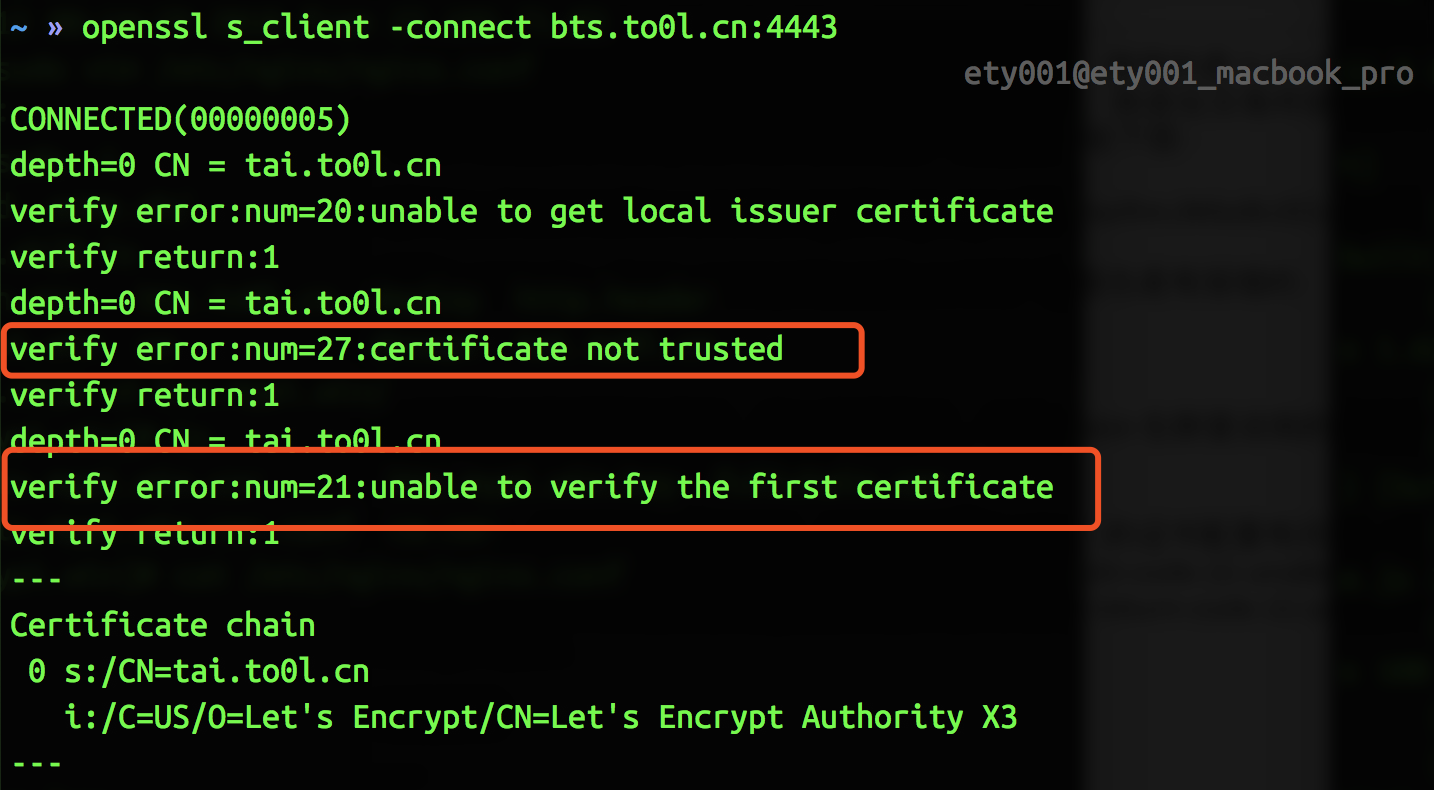
之前在家里的服务器上搭建了一个 BTS 的 API 节点,使用的是 Let’s Encrypt 的证书服务。搭建好以后,一直有一个奇怪的问题没有解决,就是在交易所使用没有问题,但是用 wscat 连接就会报 Error: unable to verify the first certificate 的错误,如下图:
git clone https://github.com/ety001/yoyow-witness-watcher.git cd yoyow-witness-watcher
2.部署 yoyow_client,并提供 RPC 服务。
1
./init.sh
首先提示你输入 yoyow_client 的下载地址:
1 2 3 4 5 6 7 8
********************************************* Welcome to use YOYOW witness watcher. This tool is made by ETY001. (https://github.com/ety001) My YOYOW ID is 485699321. It's pleasure to get your votes! *********************************************
Please input current yoyow_client download URL (https://github.com/yoyow-org/yoyow-core/releases/latest): https://github.com/yoyow-org/yoyow-core/releases/download/v0.2.1-180313/yoyow-client-v0.2.1-ubuntu-20180313.tgz
当看到出现 Listening for incoming HTTP RPC requests on 0.0.0.0:9999 以及 new >>> 的时候说明 yoyow_client 的 docker 镜像已经做好,现在开始创建钱包并导入你的账号
1 2 3 4 5 6 7 8 9 10 11
Create wallet Logging RPC to file: logs/rpc/rpc.log 3505859ms th_a main.cpp:120 main ] key_to_wif( committee_private_key ): 5KCBDTcyDqzsqehcb52tW5nU6pXife6V2rX9Yf7c3saYSzbDZ5W 3505862ms th_a main.cpp:124 main ] nathan_pub_key: YYW6MRyAjQq8ud7hVNYcfnVPJqcVpscN5So8BhtHuGYqET5GDW5CV 3505862ms th_a main.cpp:125 main ] key_to_wif( nathan_private_key ): 5KQwrPbwdL6PhXujxW37FSSQZ1JiwsST4cqQzDeyXtP79zkvFD3 Starting a new wallet with chain ID ae4f234c75199f67e526c9478cf499dd6e94c2b66830ee5c58d0868a3179baf6 (from egenesis) 3505863ms th_a main.cpp:172 main ] wdata.ws_server: wss://wallet.yoyow.org/ws 3506840ms th_a main.cpp:177 main ] wdata.ws_user: wdata.ws_password: Please use the set_password method to initialize a new wallet before continuing 3509652ms th_a main.cpp:243 main ] Listening for incoming HTTP RPC requests on 0.0.0.0:9999 new >>>
Please input Your Public Key: If you have multiple public keys, separate them with commas eg. YYW7TSRLZ9EXZps37Kt31qa7qi,YYW7TSRLZ9EXZpZqk25atoL2s37 YYW7TSRLZ9EXZpZqk25atoL2s37Kt31qa7qi78ZR368kCN969rFiT,YYW733FxEEaAFTHxdTJdowZyQzJ3JnPocsVmdq4aSsm1gSd1VkYDC
Please input Discord webhook for notify (If you don't need it, leave empty.): https://discordapp.com/api/webhooks/433204170/X2RWo7-qiFlnMtQeQkk_sSgb5Vn0rQVWZCF5f
当你看到类似以下信息的时候,就已经完成了所有部署工作。
1 2 3 4 5 6 7 8 9 10 11 12 13 14 15 16 17 18 19
Get status string(20) "global value in init" array(2) { [0]=> string(53) "YYW7TSRLZ9EXZpZqk25atoL2s37Kt31qa7qi78ZR368kCN969rFiT" [1]=> string(53) "YYW733FxEEaAFTHxdTJdowZyQzJ3JnPocsVmdq4aSsm1gSd1VkYDC" } string(9) "485699321" string(27) "http://172.20.99.2:9999/rpc" int(3) send_notify:"" witness_info: [{"id":"1.5.118","account":485699321,"name":"yoyo485699321","sequence":1,"is_valid":true,"signing_key":"YYW7TSRLZ9EXZpZqk25atoL2s37Kt31qa7qi78ZR368kCN969rFiT","pledge":"4800000000","pledge_last_update":"2018-04-09T16:27:36","average_pledge":"4769814330","average_pledge_last_update":"2018-04-10T09:29:36","average_pledge_next_update_block":6208938,"total_votes":"1012502907669","by_pledge_position":"0","by_pledge_position_last_update":"13192707760156474609520154309632187","by_pledge_scheduled_time":"13192779100955781906176323330356157","by_vote_position":"0","by_vote_position_last_update":"8327365446400524735205121087916251","by_vote_scheduled_time":"8327365782480909634055199728870765","last_confirmed_block_num":6208607,"last_aslot":6220862,"total_produced":1143,"total_missed":3,"url":"https:\/\/github.com\/ety001"}] total_produced: 1143, total_missed: 3 2018-04-10 10:23:38